

Changing the session name
The edit button will appear when you hover over the session name in the sidebar.
Changing the session model
You can change the session name and model here.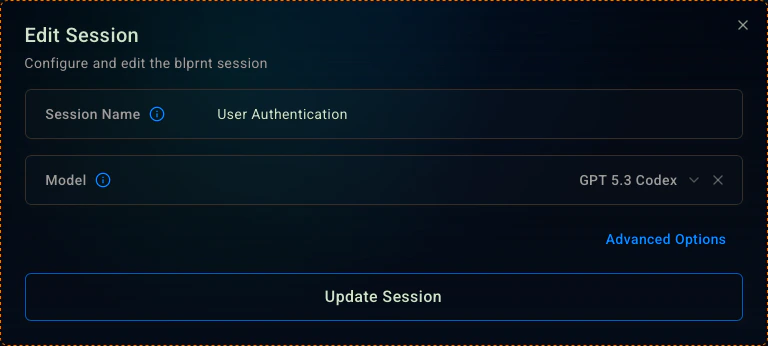
Advanced Options
Click the ‘Advanced Options’ button to access the advanced settings.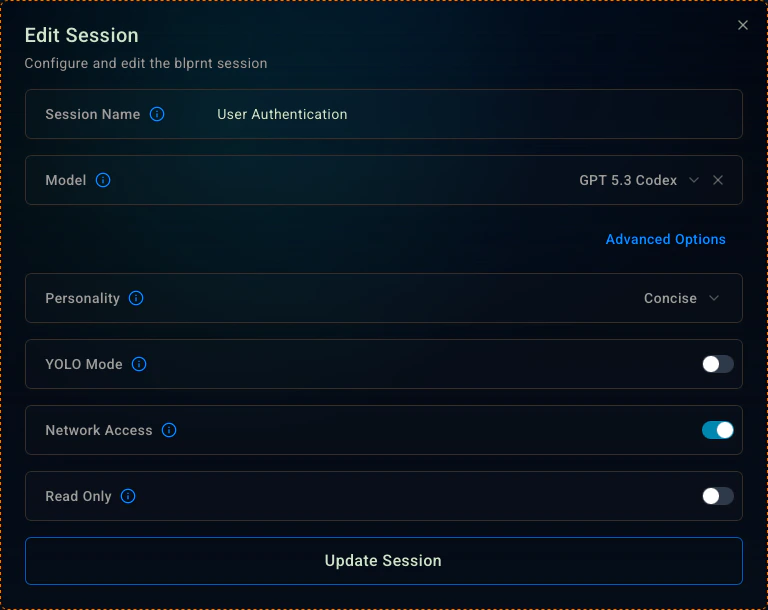
Personality: Definitions below. This affects the tone and output style of the agent. It does not affect the code quality.
Network Access: On by default. This allows the agent to use tools that require internet access. e.g. npm install, pip install, etc.
Read Only: This keeps the agent in an even more restricted mode. It will not be able to make any changes to the filesystem. Useful for research and verification or when you want to keep the agent from making changes to the filesystem.
Personalities
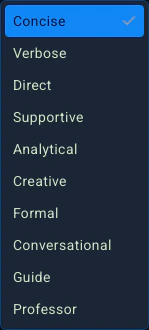
| Name | Description |
|---|---|
| Concise | Gives direct, minimal responses focused purely on action and results. |
| Verbose | Provides complete, detailed explanations with full context and reasoning. |
| Direct | Delivers confident, command-like answers without hesitation or filler. |
| Supportive | Encourages learning through calm, patient, and positive guidance. |
| Analytical | Breaks problems into logical steps with clear evidence and structure. |
| Creative | Explores imaginative, unconventional solutions and expressive explanations. |
| Formal | Communicates with professional precision, structure, and technical accuracy. |
| Conversational | Speaks naturally and accessibly, like a knowledgeable peer. |
| Guide | Teaches through clear, step-by-step explanations and practical insight. |
| Professor | Uses questions and prompts to lead you toward discovering the answer yourself. |